


Nationwide IT Equipment Laboratory and Data Center Relocation Services

Updated: 2 days ago
Moving servers, network gear, industrial technology, or critical laboratory equipment is not the same as moving office furniture. A failed lift, a missing cable label, a poorly packed rack, or a damaged controller can interrupt operations and create expensive downtime.
That is why technology moves need a different level of planning. The equipment is often heavy, sensitive, high value, hard to replace, and tied to a larger system that must work again at the destination.
Nationwide IT equipment and data center relocation services bring together several specialties under one plan: machinery moving, technical de-installation, transportation, re-installation support, and site coordination. The work can include a few server racks, a full data center shutdown, a corporate lab relocation, or industrial equipment that blends IT, automation, and production control.
The goal is simple: move critical equipment safely, document every step, and help the destination site get back online with less disruption.
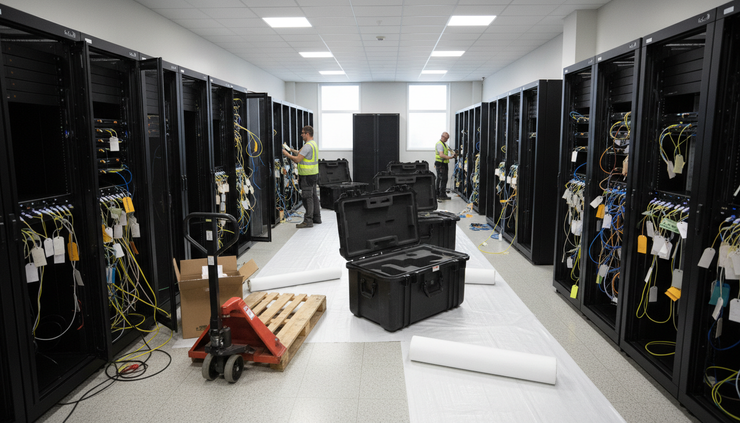
Technology equipment moves require more than manpower
IT and laboratory moves combine physical risk with technical risk. The items may look durable from the outside, but many contain delicate components, calibrated parts, stored configurations, or connections that must return to a precise state.
A general mover may be able to carry a cabinet. A specialized technology moving team plans for what happens before and after the carry.
Key concerns include:
Weight and access
Server cabinets, battery cabinets, lab analyzers, storage arrays, and industrial control panels can exceed what a standard crew can safely handle. Door widths, floor ratings, elevator capacity, loading dock height, and ramp angles all matter.
Static and vibration
IT equipment can be sensitive to electrostatic discharge, shock, and vibration. Packing, padding, and transport methods should match the equipment type.
System dependencies
A rack is rarely just a rack. It may include power paths, network connections, fiber, patch panels, cooling needs, and links to other systems.
Documentation
If labels, photos, rack maps, and chain-of-custody records are poor, re-installation can slow down fast.
Downtime
The move schedule often has to fit around maintenance windows, production shifts, customer commitments, or compliance needs.
These details are why technology relocation often involves project managers, riggers, IT staff, electricians, facilities teams, and logistics specialists working from the same move plan.
What data center de-installation usually includes
Data center de-installation is the controlled removal of hardware from an existing site. It can involve a single cage, a colocation footprint, an enterprise server room, or a full facility.
The work often begins before anyone touches a rack. A site survey helps confirm equipment counts, cabinet sizes, floor paths, power conditions, loading access, staging areas, and destination requirements. This also helps identify special needs, such as lift gates, stair carries, dock plates, pallet jacks, server lifts, or cranes.
A careful de-installation plan may include:
Stage | What happens | Why it matters |
Inventory | Equipment is counted, tagged, and matched to the move scope | Prevents lost assets and supports chain of custody |
Power-down support | IT teams shut down systems in the planned order | Reduces the risk of data loss or hardware faults |
Cable labeling | Network, power, and fiber connections are labeled and photographed | Speeds re-installation at the new site |
Rack removal | Devices, rails, shelves, and cabinets are removed as planned | Controls weight and protects components |
Packing | Equipment is wrapped, cushioned, crated, or loaded into cases | Protects against shock, dust, and handling damage |
Transport | Loads are secured for the route and vehicle type | Reduces vibration and movement in transit |
Delivery staging | Equipment is placed by room, row, rack, or install sequence | Keeps the receiving site organized |
Some moves require servers to remain inside cabinets during transport. Others require equipment to be removed and packed separately. The right choice depends on rack condition, weight, route, elevator access, cabinet design, and the tolerance of the hardware.
For high-density cabinets, removing equipment can make the move safer. For pre-cabled or integrated systems, keeping a controlled rack build intact may reduce re-installation time. The decision should come from the survey, not guesswork.

Relocation planning keeps the move from becoming a scramble
A successful relocation depends on sequencing. Equipment should leave in the right order, travel with the right protection, and arrive in the order needed for re-installation.
For a data center relocation, the move plan often includes rack elevations, destination floor plans, shipment lists, contact trees, cutover windows, and escalation steps. For corporate and industrial laboratory moves, the plan may also include utility disconnects, calibration needs, hazardous material handling rules, and coordination with equipment vendors.
A good plan answers practical questions before move day:
Which systems must stay online until the last possible moment?
Which items need vendor de-installation or vendor re-start?
Which racks, benches, instruments, or machines need special rigging?
Are there floor protection requirements at either site?
Can the loading dock handle the equipment and vehicle?
Are elevators rated for the load?
What equipment must arrive first at the new location?
Who confirms that each asset is received?
A nationwide move adds more variables. Long-distance transport means more handling, more scheduling points, and more need for documentation. Weather, route limits, building rules, and delivery windows can affect timing. The best move plans leave room for real-world conditions without losing control of the schedule.
For large projects, phased moves may reduce risk. One group of systems can move, install, and test before the next group begins. This approach can work well for hybrid environments, lab expansions, consolidations, and staged data center exits.
Machinery movers have a key role in technology projects
The phrase “IT equipment” can sound small, but many technology moves require machinery moving skills. Server cabinets, UPS systems, battery strings, network infrastructure, mainframes, storage frames, industrial computers, robotics controllers, medical research devices, and laboratory instruments all require controlled handling.
Nationwide machinery movers bring the equipment, rigging methods, and load planning needed for heavy or awkward assets. That can include:
Forklifts and pallet jacks
Server lifts and material lifts
Gantries, skates, and dollies
Crating and blocking
Air-ride trucks
Lift-gate delivery
Dock-to-dock and inside delivery
Floor and wall protection
Stair, elevator, and tight-access planning
This matters most when technology sits in older buildings, industrial plants, hospitals, research spaces, colocation facilities, or clean technical rooms with strict access rules.
The physical route can be as important as the destination. A cabinet may fit through a door but fail at a turn. A freezer may clear a hallway but exceed an elevator rating. A lab instrument may need to stay level during handling. A UPS cabinet may need battery weight removed before safe transport.
Safe movement starts with measuring, not muscle.

Laboratory de-installations need technical control
Corporate and industrial laboratory relocations have their own challenges. Lab assets are often expensive, sensitive, and connected to building systems. Some require vendor support for shutdown, packing, calibration, and re-start. Others need special environmental care during the move.
Common laboratory relocation work includes:
Disconnecting and preparing instruments for transport
Moving benches, cabinets, fume hoods, and support equipment
Packing glassware, instruments, and accessories
Coordinating freezer, refrigerator, and cold-room equipment moves
Handling vibration-sensitive devices
Managing utility disconnects and reconnect coordination
Supporting re-installation and placement by room or workflow
Lab moves also require close attention to safety and compliance. Some materials or residues may need removal before equipment can be handled. The moving team should know what it is allowed to move, what requires a licensed specialist, and what must be handled by the client or a qualified vendor.
Cold storage deserves special care. Ultra-low freezers and refrigerated units may involve valuable samples, temperature limits, backup power, dry ice planning, or staged transport. The relocation plan should define who manages contents, who monitors temperature, and what happens if a delay occurs.
For industrial labs, equipment may tie into production systems, compressed air, water, gas lines, exhaust, or data connections. That means de-installation and re-installation should be coordinated with facilities, environmental health and safety, equipment vendors, and internal technical teams.
Re-installation is where planning proves itself
A move is not finished when the truck door closes. The real test comes when equipment reaches the new site.
For data center and IT equipment, re-installation may include placing cabinets, setting rack positions, reinstalling rails and devices, reconnecting labeled cables, supporting power-up, and helping IT teams validate systems. The move crew may not configure the network or servers, but accurate placement and documentation can make technical cutover faster.
For laboratory and industrial equipment, re-installation support may include placing equipment on benches or pads, leveling, anchoring where required, coordinating utility reconnections, and staging accessories with the correct instruments.
This is where earlier details matter:
Labels match photos.
Asset lists match delivered items.
Racks arrive in the planned order.
Crates are marked by room or system.
Accessory boxes stay with the parent equipment.
Delivery crews know the destination layout.
Small mistakes can create long delays. A missing rail kit, misplaced power cord, or unlabeled fiber connection can hold up a system that otherwise arrived safely. Good relocation teams treat accessories and documentation as part of the equipment, not as loose extras.
What to look for in a nationwide technology moving partner
Not every mover is suited for technical equipment. A provider that handles nationwide IT, data center, and laboratory relocations should be able to show a clear process and ask detailed questions early.
Look for a team that can support:
Pre-move site surveys
Surveys help confirm access, weight, dock conditions, room layout, and handling needs.
Project planning
A written plan should define scope, timing, crew roles, equipment lists, and communication paths.
Specialized equipment handling
The team should know how to handle racks, servers, storage frames, lab instruments, UPS cabinets, and other heavy technical assets.
Packing and crating
Sensitive equipment may need anti-static materials, foam, custom crates, shock protection, or sealed cases.
Nationwide logistics
Long-distance moves require route planning, secure loading, delivery coordination, and consistent documentation across states.
Chain of custody
Asset tracking helps confirm what was picked up, where it traveled, and who received it.
De-installation and re-installation support
The provider should coordinate with IT, facilities, vendors, and local site contacts.
Insurance and safety practices
Technical moves involve high-value assets. Coverage, safety planning, and crew training should match the risk.
The right partner will not rush to quote from a vague equipment list. They will ask about access, dependencies, timing, shutdown rules, packing standards, and destination readiness.

A practical checklist before move day
Before a technology relocation begins, the project team should confirm the basics. This checklist applies to data centers, IT rooms, corporate labs, and industrial technical spaces.
Confirm the final equipment inventory.
Identify which items move, stay, sell, recycle, or dispose.
Remove unrelated materials from racks, benches, and cabinets.
Back up critical systems before shutdown.
Label cables, devices, boxes, and accessories.
Photograph rack fronts, rack backs, connections, labels, and bench setups.
Confirm building access hours at both sites.
Reserve elevators, docks, and staging areas.
Verify insurance requirements with each facility.
Share emergency contacts and decision makers.
Confirm who signs off at pickup and delivery.
Plan for waste, pallets, old cable, and packing materials.
Define when the move is complete.
For laboratories, add any vendor requirements, decontamination steps, temperature control plans, and calibration needs. For data centers, add rack maps, power details, network diagrams, patching plans, and cutover timing.
The more specific the checklist, the fewer decisions the team has to make under pressure.
The best moves feel uneventful
The ideal technology relocation is controlled, documented, and calm. Crews arrive with the right tools. Equipment is ready. Labels make sense. Pathways are protected. Trucks load in the planned order. The receiving site knows what is coming and where it goes.
That kind of move does not happen by accident. It comes from survey work, technical planning, careful packing, skilled machinery moving, and clear communication from pickup through re-installation.
Whether the project involves data center de-installation, a cross-country server relocation, an industrial control room move, or a corporate laboratory re-installation, the same rule applies: protect the equipment, protect the schedule, and protect the information needed to put everything back together.
A nationwide technology move is a high-stakes handoff. With the right plan and the right moving team, it can be handled with precision instead of stress.


Comments